
Word Hunt Solver: Find Every Word on Your Board
Type or upload your board and see every word's path.
Arrow keys to move, Enter to solve
Upload a clear screenshot of your full Word Hunt board (PNG, JPG, or WebP), and the letters fill in for you to check.
What Is a Word Hunt Solver?
It's a free tool that lists every word from its word list that you can build on a Word Hunt board. You type or upload the letters in the same spots they appear in the game, and the tool follows every path of touching tiles that could still form a word. Think of it as a word solver made for one job: finding words on a letter grid.
How Does a Word Hunt Solver Work?
It follows the game's rules, then checks each word against a word list.
Following Connected Letters Across the Grid
The solver starts on each tile, steps to a neighboring tile, and builds letter sequences one tile at a time. It stores its word list as a trie, which is a tree of word beginnings. If no word in its list starts with the letters on the current path, it drops that path and tries another. This is called a depth first search.
Which Word List Our Solver Uses
Every match is checked against the ENABLE word list, a public domain dictionary built for word game players. The solver checks every word in that list that is 3 letters or longer.
How to Use Our Word Hunt Solver Step by Step
Video transcript
Stuck on a Word Hunt board? Let's find every word, fast! Just head to wordhuntsolvers.com. Start with a 4x4 grid. Type each letter right where it sits on your game board. The cursor jumps ahead for you, so it's quick! Now hit Solve. Boom! Every word, longest first, with its points. 50 words on this board! Got a bigger board? Tap Clear, then set rows and columns to 5. Type in your new letters, same as before. Hit Solve again. 123 words! The top one is worth 2,200 points. Now it's your turn!
Set Your Grid Size (3x3 up to 6x6)
Pick the number of rows and columns, from 3 to 6 each. Most Word Hunt boards are 4x4 or 5x5. If a spot on your board has no letter, leave that tile blank and the solver will skip it.
Type or Upload Your Board Letters
Enter each letter in the same spot it holds in the game. The cursor moves to the next tile on its own. You can also upload a screenshot of your board instead. The solver reads the letters and fills in the grid for you. Check each tile and fix any mistakes before you solve. Your last board stays saved on your device, so it is still there if you reload the page.
Tap Solve to See Every Word
The results list shows every valid word, grouped by length with the longest first, plus the points for each word and the total for the board. You can filter the list by word length or by the letters a word starts or ends with, and copy it in one tap.
Tap Any Word to See Its Path on the Board
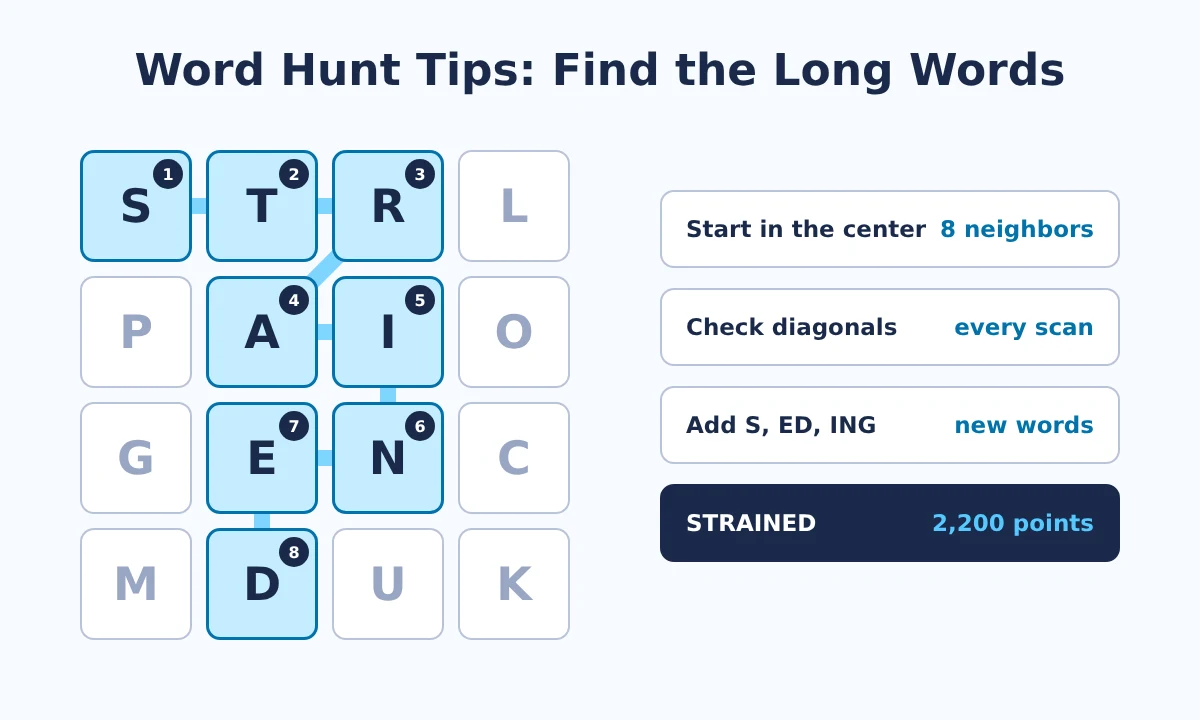
The tiles for that word light up on the grid, and numbers on the tiles show the swipe order, starting at 1.
Keyboard Shortcuts for Faster Solving
The arrow keys move between tiles, Enter solves the board, and Backspace jumps back one tile.
What Is Word Hunt on GamePigeon?
Word Hunt is one of the word puzzle games in GamePigeon. You find as many words as you can on a letter grid before time runs out. It plays a lot like Boggle.
What Is GamePigeon?
GamePigeon is a pack of games that runs inside iMessage on iPhone and iPad. It also includes other word games, such as Anagrams and Word Bites.
How Do You Play Word Hunt on iMessage?
Open a chat, tap the GamePigeon app, pick Word Hunt, and send it to a friend. The higher score wins.
Word Hunt Rules: How Letters Connect
Drag your finger across adjacent letters to make a word. You can move up, down, sideways, or diagonally. Every word needs at least 3 letters, and you can't use the same tile twice in one word.
How Does Word Hunt Scoring Work?
Word Hunt scores each word by its length. Every letter counts the same, and there are no bonus squares, so a Q earns no more than an E.
| Word length | Points |
|---|---|
| 3 letters | 100 |
| 4 letters | 400 |
| 5 letters | 800 |
| 6 letters | 1,400 |
| 7 letters | 1,800 |
| 8 letters | 2,200 |
One 7 letter word earns as much as eighteen 3 letter words.
Quick Tips to Score More in Word Hunt
Long words win rounds, because points jump with every extra letter. Start from the center tiles, where each tile touches the most neighbors, and check diagonals as often as rows. Spotting words in a word adds quick points, and adding S, ED, or ING to a word you've found often makes a new one. For the full routine, scoring math, and two real boards we solved, see our Word Hunt strategy guide.
How Can a Solver Help You Get Better at Word Hunt?
After a round, enter the same board here and compare the results with the words you found. The words you missed show which patterns to watch for next time. For practice, our Board Evolver builds boards with high total scores.
Why Didn't Word Hunt Accept My Word?
The Game Uses a Different Word List
We haven't found a public copy of GamePigeon's word list. Our solver uses ENABLE, and the two lists aren't identical, so the game sometimes refuses a word the solver shows.
The Letters Don't Connect
Each letter must touch the one before it, and no tile can repeat.
The Board Was Entered Incorrectly
One wrong tile changes every result, so check your letters before you tap Solve.
Why Is a Word Missing From the Results?
If you can't find a word you expected, check two things. The solver lists a word only if its letters connect on your board and it appears in the ENABLE list. Names aren't in that list, and words shorter than 3 letters don't count in Word Hunt.
What Should You Look for in a Word Hunt Solver?
Look for six things: support for the board sizes you play, quick board entry by typing or screenshot, word paths shown on the grid, a named word list, no download or signup, and privacy for your board. This tool covers all six.
How Is This Tool Different From Other Word Tools?
Each word game solver works differently. A word search solver finds hidden words that run in straight lines. A word finder, also called an unscrambler, takes loose letters you can rearrange in any order. Word Hunt works differently: the letters stay in place, and every word has to follow touching tiles. See our comparison guide for details.
About This Tool
Purpose of Building This Tool
This tool helps Word Hunt players check every word on a board, see exactly how to swipe it, and learn from the words they missed.
Your Board Stays on Your Device
Everything runs in your browser. Your letters and screenshots are never sent to our server.
More Word Hunt Guides and Tools
Our guides answer one Word Hunt topic each, in depth. Pick the one that fits what you need right now, or train with our second free tool.
How to Win at Word Hunt: Tips and Strategy
Scoring math, a scanning routine, ways to build longer words, and two real boards we solved, with every word counted.
Read the guide
Word Hunt Cheat Guide: Fair Ways to Find More Words
When a solver is fair, how people cheat, and a cheat sheet of prefixes, suffixes, and short words you can use without any tool.
Read the guide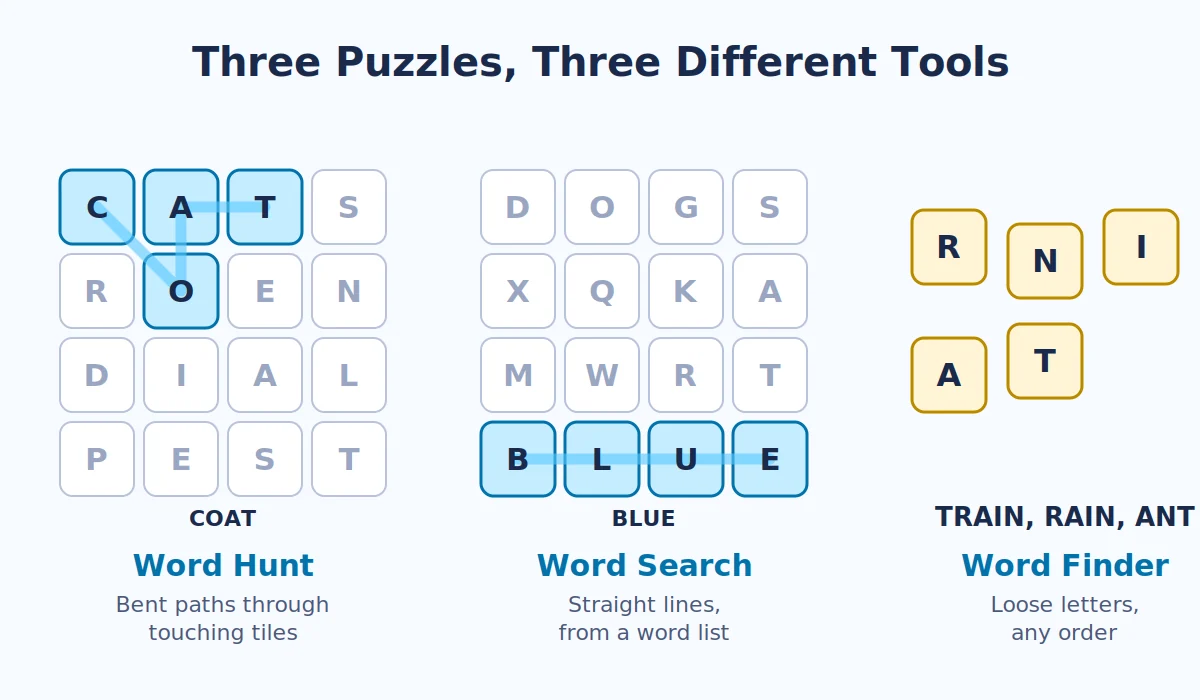
Word Hunt Solver vs Word Finder vs Word Search Solver
Which word tool fits which puzzle, why Word Hunt isn't a word search, and how it compares with Boggle.
Read the guideFrequently Asked Questions
QDoes this Tool use AI?
No. It uses a fixed word list and a search through touching tiles, so the same board always gives the same results. Screenshot uploads read each letter by comparing its shape with letter patterns, and that also runs in your browser.
QCan I use it on Android?
Yes. It runs in any modern browser on Android, iPhone, iPad, or a computer. GamePigeon itself only runs in iMessage on Apple devices.
QIs it free?
Yes. It's free to use, with no account or signup.
QDo I need to download an App?
No. Open this page and start typing or upload a screenshot.
QCan I upload a Screenshot of my Board?
Yes. Upload a screenshot from your iPhone, iPad, Android phone, or computer. The solver reads the letters, works out the grid size, and fills in the board. Check the letters, fix any tile it misread, then tap Solve.
QIs Word Hunt scored like Scrabble?
No. Scrabble gives letters different values and has bonus squares. Word Hunt scores by word length only.
QDoes it work on 5x5 and 6x6 Boards?
Yes. Set the rows and columns to match your board, from 3x3 up to 6x6.
QDoes it work for Word Hunt on iMessage?
Yes. Type the letters from your iMessage board in the same layout, or upload a screenshot, then tap Solve.
QIs this Site affiliated with GamePigeon?
No. This is an independent site with no connection to GamePigeon or Apple.
Start Solving Your Word Hunt Board Now
Type your letters or upload a screenshot of your board, then tap Solve to see every word and its swipe path.
Help Us Improve This Tool
Found a bug, a word the solver missed, or have an idea for a new feature? Send us your feedback.
Send Feedback